FAQ · Safety
Should I turn off the HVAC before removing a cover?
A practical safety answer for homeowners removing a decorative register cover. This does not replace local codes or a technician when access is unsafe.
Quick Answer
Yes — turn the system off (or set the fan to Off) before loosening the cover when dust, fasteners, or debris could enter an active airstream. Support ceiling faces carefully. Power-off does not fix a wrong size.
Why turn it off
- Reduces dust blown into the room while the opening is exposed.
- Lowers the chance of screws or debris being pulled into active airflow.
- Gives you a quieter moment to dry-fit the new cover.
If you cannot reach the thermostat or disconnect safely, stop and get local help rather than working over a running blower.
Safe sequence
- Set the thermostat so heat/cool and fan are Off (or otherwise stop the blower).
- Gather a parts cup, correct driver bit, and stable access (ladder for ceilings).
- Support the face before the last fastener loosens.
- Keep screws in the cup — do not drop them into the opening.
- Dry-fit the new Size+Color cover before final fasteners.
- Restore the system only after the face is secured and the area is clear.
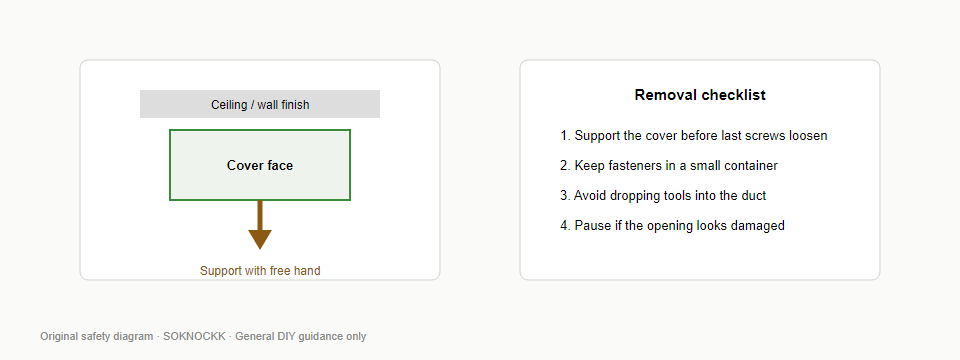
Ceiling extra
Ceiling work needs a free hand (or helper) plus a stable ladder. Do not stand on stacked furniture. If you cannot support the face safely with the blower off, pause and review the full replace guide.
Common mistakes
- Leaving the fan on “for cooling” while screws are loose over the opening.
- Skipping dry-fit because the old label “looked right.”
- Assuming power-off replaces measuring — it does not.